insurance
2 minwebinar
Learn how to create a car insurance comparison page that feels like an advisor instead of a spreadsheet. Reduce friction and guide users to the right choice.
By Linda
Car insurance represents a unique challenge in digital commerce. It's an intangible product that consumers must buy but rarely want to think about. This makes the product comparison page a critical friction point where conversions are won or lost.
Research shows that most comparison pages overwhelm users with long specification lists and subtle distinctions. Instead of supporting decision-making, they force visitors to interpret differences and translate them to their own situation. At a moment when clarity is essential, this increases mental effort and often leads to choice paralysis.
The best-performing funnels take a fundamentally different approach. Rather than presenting information neutrally, they actively guide users toward the option that best fits their needs. This shift from passive comparison to active guidance reduces cognitive load and creates confidence at the decision moment.
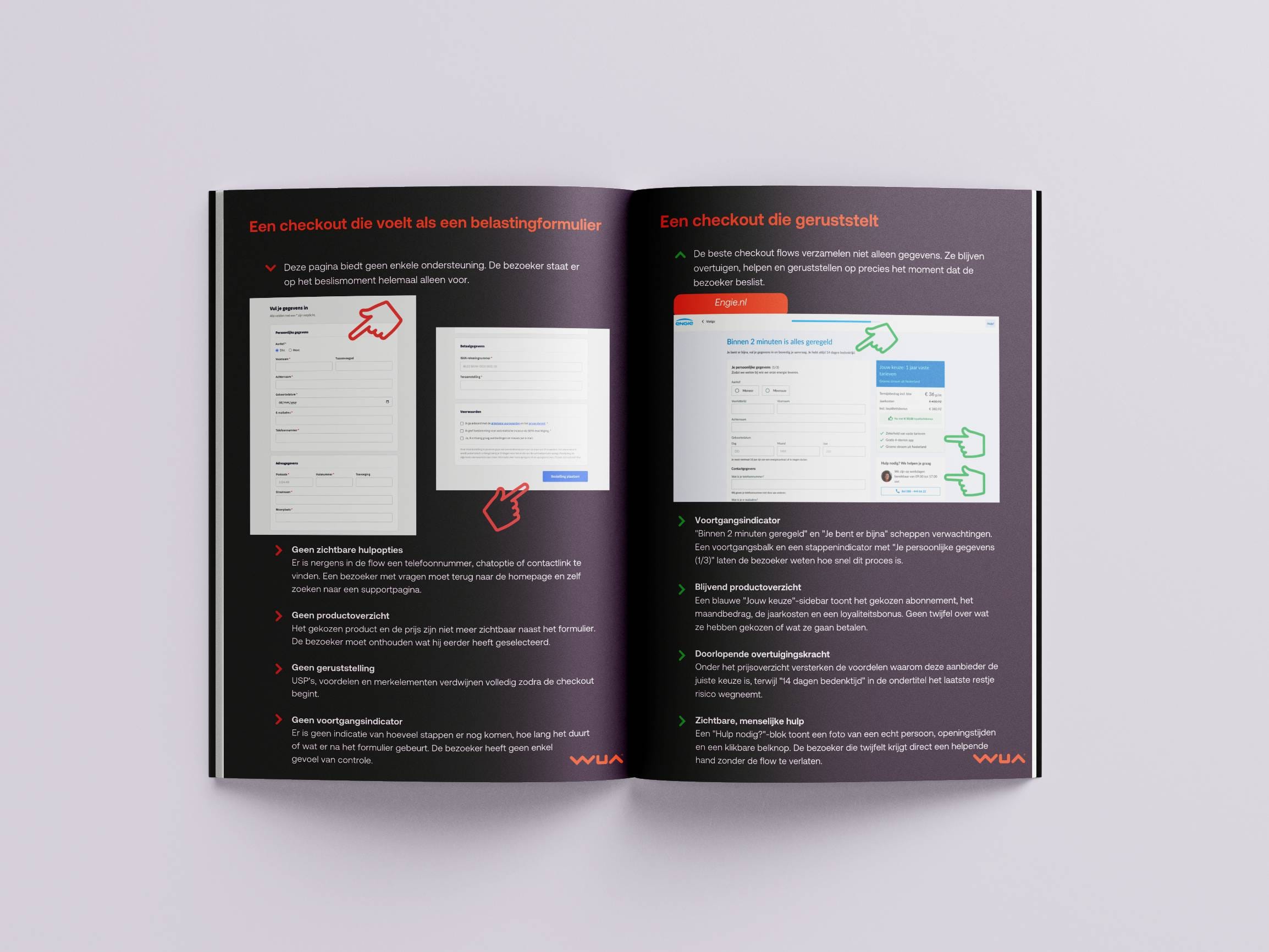
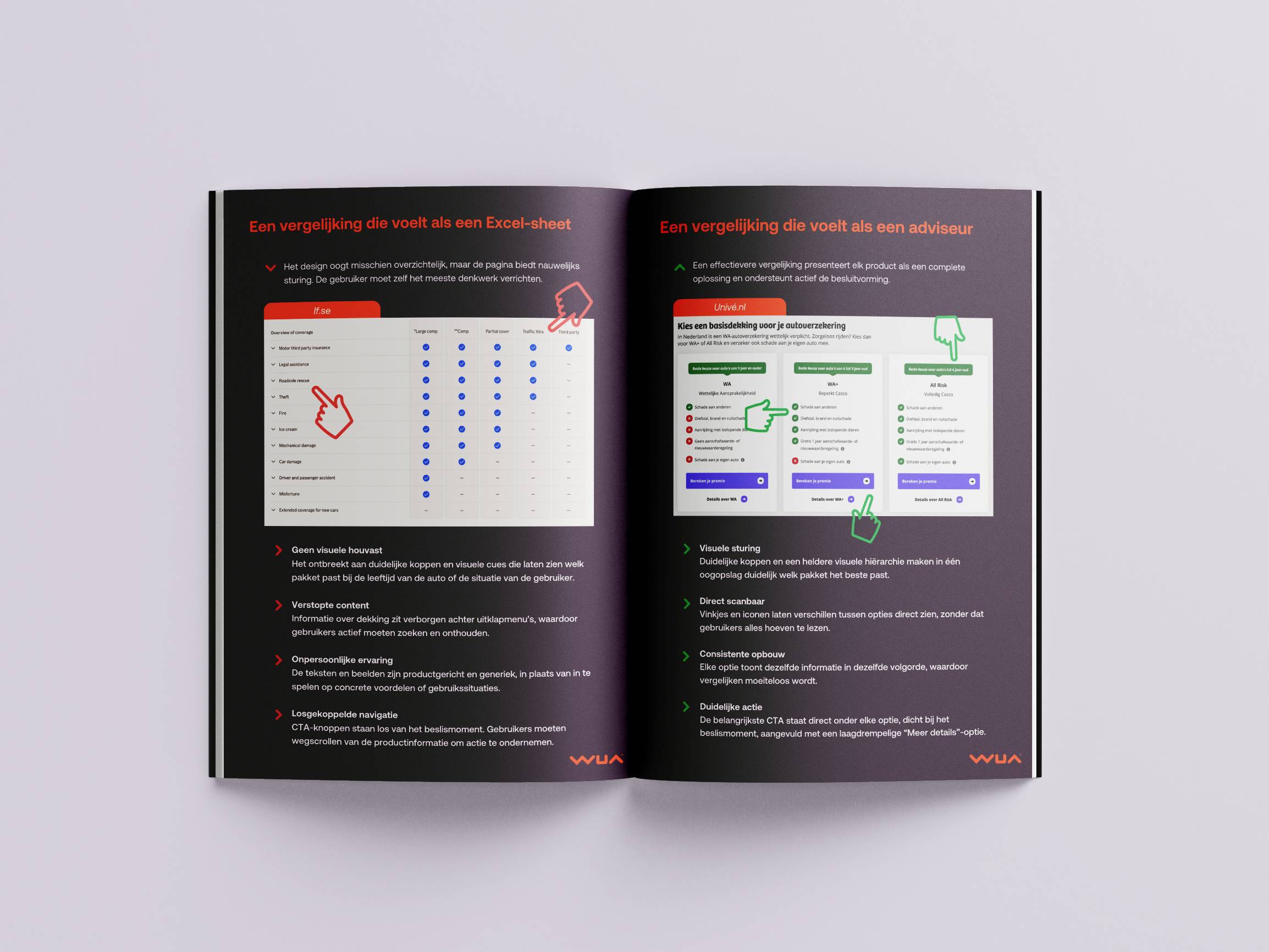
This whitepaper contrasts two real-world examples. If.se demonstrates common pitfalls: a spreadsheet-like layout with no visual guidance, important details hidden behind accordions, impersonal copy, and CTAs disconnected from the product decision.
Univé.nl shows the alternative. Their tile-based design presents each option as a complete solution with distinct headers, instant scannability through checkmarks and crosses, consistent information architecture, and CTAs placed directly below each product.
The difference between these approaches isn't subtle. It's the difference between asking users to work harder and making their decision easier. Use the included checklist to assess where your comparison page stands, and discover concrete opportunities to reduce friction and increase conversion in your funnel.
Car insurance represents a unique challenge in digital commerce. It's an intangible product that consumers must buy but rarely want to think about. This makes the product comparison page a critical friction point where conversions are won or lost.
Research shows that most comparison pages overwhelm users with long specification lists and subtle distinctions. Instead of supporting decision-making, they force visitors to interpret differences and translate them to their own situation. At a moment when clarity is essential, this increases mental effort and often leads to choice paralysis.
The best-performing funnels take a fundamentally different approach. Rather than presenting information neutrally, they actively guide users toward the option that best fits their needs. This shift from passive comparison to active guidance reduces cognitive load and creates confidence at the decision moment.
This whitepaper contrasts two real-world examples. If.se demonstrates common pitfalls: a spreadsheet-like layout with no visual guidance, important details hidden behind accordions, impersonal copy, and CTAs disconnected from the product decision.
Univé.nl shows the alternative. Their tile-based design presents each option as a complete solution with distinct headers, instant scannability through checkmarks and crosses, consistent information architecture, and CTAs placed directly below each product.
The difference between these approaches isn't subtle. It's the difference between asking users to work harder and making their decision easier. Use the included checklist to assess where your comparison page stands, and discover concrete opportunities to reduce friction and increase conversion in your funnel.
Introduction: Complexity Causes Friction
Product comparisons often overwhelm users with long lists and subtle distinctions, creating choice paralysis instead of clarity. Active guidance reduces cognitive load and drives conversion by helping users confidently choose the right option.
Don't: Product Comparison that Feels Like a Spreadsheet
If.se demonstrates common mistakes including lack of visual guidance, hidden content behind accordions, impersonal copy, and disconnected CTAs that increase friction at the decision moment.
Do: Product Comparison That Feels Like an Advisor
Univé.nl shows best practices with distinct headers, instant scannability using checkmarks and crosses, consistent information architecture, and clear CTAs placed directly below each option.
Checklist: Optimizing Your Product Comparison
A practical checklist to assess whether your comparison page supports decision-making, covering recommended options, visual cues, hierarchy, CTA placement, and value communication.
Next Steps: Optimize Your Funnel
An invitation to book a consultation call to review your specific comparison flow, identify friction points, and discover concrete improvement opportunities.
Enter your email and get instant access to all our content: 250+ articles, case studies, masterclass recordings, and whitepapers.
Already registered? Enter your email to get instant access again.
Discover how WUA can help you outperform the competition.
Get in touch