
In January 2016, WUA! conducted research into the orientation behavior of 200 potential customers who used their smartphones to search for funeral insurance. We also conducted the research on desktop; Monuta was the winner of the combined research among 400 respondents.
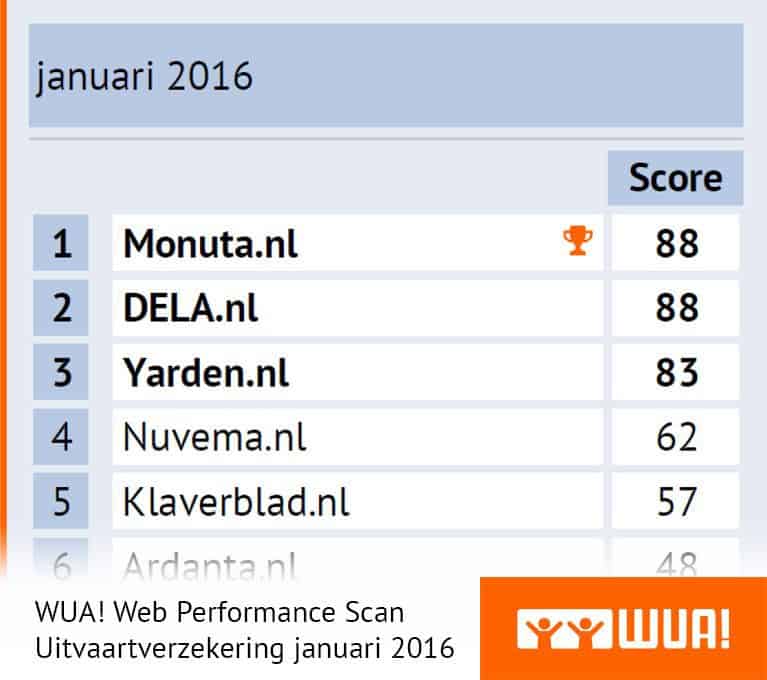
DELA.nl and Monuta.nl finish in this research with 87 points tied for first place, followed by Yarden.nl (82 points). While in the desktop research 7 providers were found, the number of providers found via smartphone stops at 5; in the WUA! Web Performance Model, only websites of providers that were found by at least 20 respondents are examined.
Top 3 rules the market
Just like in the desktop research, the gap between the top 3 and the rest is large here as well. Nuvema.nl and Klaverblad.nl follow with 21 and 24 points respectively behind number 3, Yarden.nl. The top 3 manages to capture no less than 73% of first preference in the market.
Once arriving at the ordering process, the website visitor wants to go through a process that's as smooth and pleasant as possible. No hassle with zooming in and out, letters that are too small, buttons that aren't clearly visible, or input fields that are difficult to tap. No, it's about the website connecting as well as possible with the capabilities and potential limitations (smaller screen!) of the device being used at that moment.
How do you ensure as a funeral insurer that smartphone users can go through an ordering process that's as smooth and pleasant as possible? What should you pay extra attention to? What works and what doesn't? Below you'll find 3 important tips!
1 Filling in fields MUST be simple to do
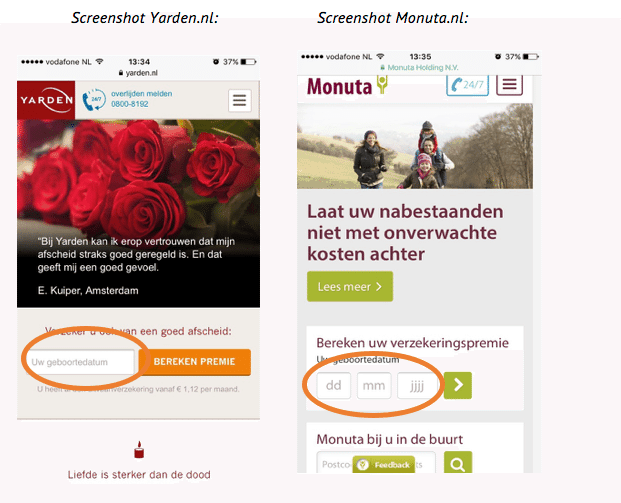
At Yarden.nl, the birth date to be filled in consists of 1 field, allowing people to quickly enter the day, month, and birth year. At Monuta.nl, the birth date consists of 3 separate fields where you have to click to a new field each time to enter day, month, and year: just a bit less user-friendly.
2 Numeric fields? Show the numeric keyboard immediately!
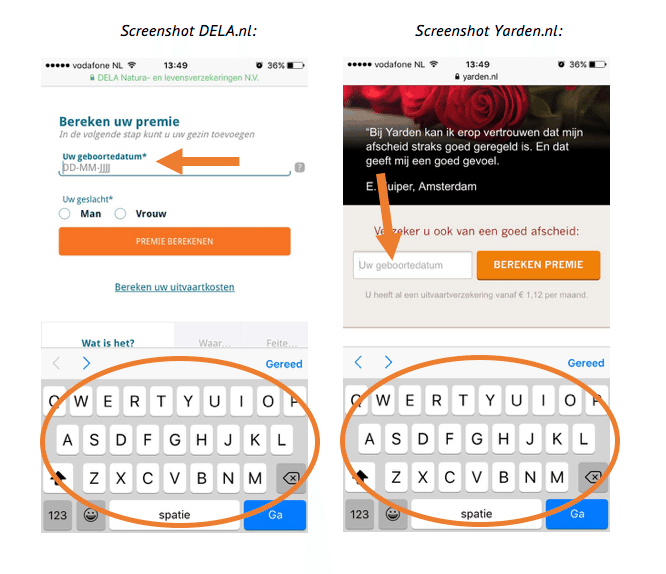
It seems so simple at first glance, but not a single (!) funeral insurer examined in this research does it: immediately showing the numeric keyboard for a numeric input field. That means an extra and actually unnecessary action for the website visitor with every numeric field. In an application process where birth date (1), postal code (2), house number (3), and phone number (4) are requested, among other things, that's quickly no fewer than 4 unnecessary actions.
3 Go for 100% responsive
Website visitors should not only be presented with a responsive website at first impression, it's also of great importance during deeper exploration that the website pages adapt to the smartphone format.
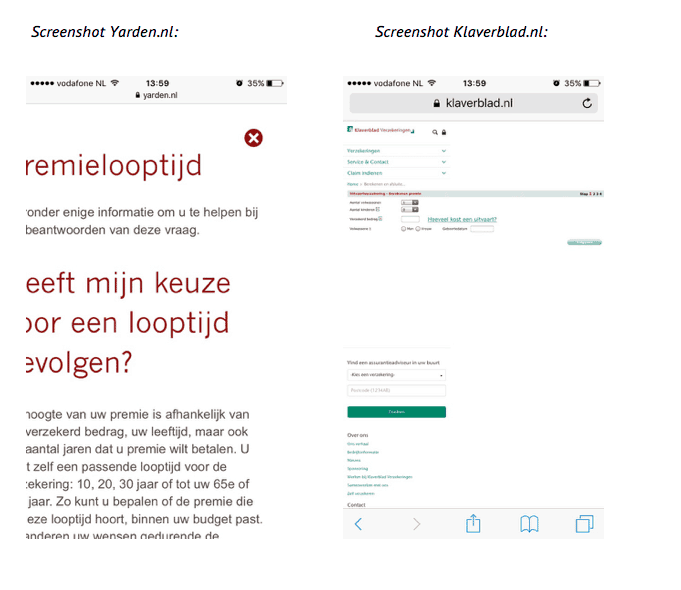
At Yarden.nl it seems to go well, until you click the link "Which term do I choose?" halfway through the ordering process. Then an incorrectly scaled and therefore only half-readable pop-up window appears that won't fit in the right window size even after a few desperate swipe attempts.
Klaverblad.nl makes it difficult for smartphone users from the moment you click the button "Calculate and apply." From that moment on, the less smartphone-friendly desktop version of the ordering process screen appears. The respondents in this research also notice this, as evidenced by quotes like: "The questions don't fit on my screen, words/buttons fall off."
Mobile ordering process: The details matter
The previous 3 tips show that an ordering process optimized for smartphones is more than just copying the desktop ordering process. A round with the smartphone through various funeral insurers shows there's still plenty to be gained in this area!