Back to all insights
Whitepaper|May 28, 2026|6 pages

Best Practices for Product Finders: Guide Visitors to the Right Choice

Reduce choice overload with a well-designed product finder. Discover best practices from Pearle and Gamma, plus a practical checklist to evaluate your own.

By Linda

Summary

Product Finders That Actually Work

Choice overload isn't about too little information. It's a cognitive problem: visitors can only process so much at once. When someone lands on a page full of options, they disengage the moment they realize they have to choose. Most websites respond by adding even more content: comparison tables, extra specs, lengthy FAQs. But that only makes choosing harder.

An effective product finder does the opposite. It takes over the thinking, asks simple questions, and translates answers into a recommendation the visitor can trust.

What the Best Product Finders Have in Common

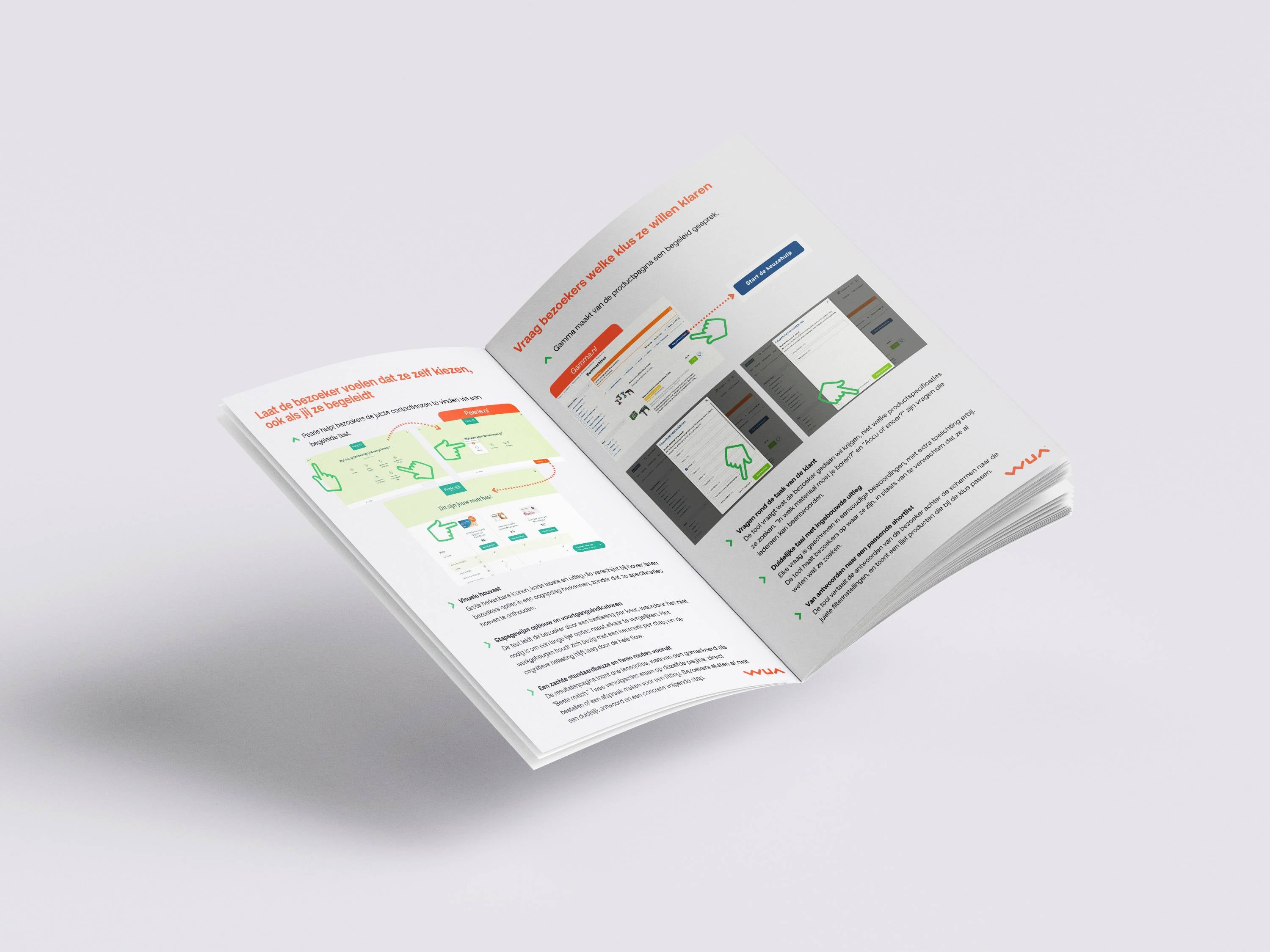
Using two real-world cases, Pearle.nl and Gamma.nl, this whitepaper shows which design principles make the difference:

  • Step-by-step structure: one question per step keeps things manageable. A progress indicator shows visitors where they are.
  • Task-based questions instead of product knowledge: Gamma asks what the visitor wants to get done, not which drill specifications they need. Anyone can answer.
  • Visual clarity: Pearle uses large icons and short labels. Visitors don't need to remember anything.
  • A soft default choice: the results page highlights one option as the 'best match', so hesitant visitors don't have to start over.
  • Two next steps: buy now, or a softer option like booking an appointment. No one leaves empty-handed.

Evaluate Your Own Product Finder

The whitepaper closes with a practical seven-question checklist to quickly assess whether your product finder truly takes the thinking off your visitors' plate, or whether they're still doing too much on their own.

Want to know where your visitors are dropping off? WUA can help you find out.
Key Takeaways

  • More information makes choosing harder, not easier.
  • A good product finder lets visitors confirm a recommendation, not weigh every option themselves.
  • Ask about the customer's task, not their product knowledge.
  • One question per step, with a progress indicator. That keeps choosing manageable.
  • Use icons and short labels. Visitors remember images, not specifications.
  • Always show a 'best match'. Hesitant visitors need a soft default to lean on.
  • Offer two next steps on the results page: buy now, and a lower-commitment alternative.
Best Practices for Product Finders: Guide Visitors to the Right Choice

Summary

Product Finders That Actually Work

Choice overload isn't about too little information. It's a cognitive problem: visitors can only process so much at once. When someone lands on a page full of options, they disengage the moment they realize they have to choose. Most websites respond by adding even more content: comparison tables, extra specs, lengthy FAQs. But that only makes choosing harder.

An effective product finder does the opposite. It takes over the thinking, asks simple questions, and translates answers into a recommendation the visitor can trust.

What the Best Product Finders Have in Common

Using two real-world cases, Pearle.nl and Gamma.nl, this whitepaper shows which design principles make the difference:

  • Step-by-step structure: one question per step keeps things manageable. A progress indicator shows visitors where they are.
  • Task-based questions instead of product knowledge: Gamma asks what the visitor wants to get done, not which drill specifications they need. Anyone can answer.
  • Visual clarity: Pearle uses large icons and short labels. Visitors don't need to remember anything.
  • A soft default choice: the results page highlights one option as the 'best match', so hesitant visitors don't have to start over.
  • Two next steps: buy now, or a softer option like booking an appointment. No one leaves empty-handed.

Evaluate Your Own Product Finder

The whitepaper closes with a practical seven-question checklist to quickly assess whether your product finder truly takes the thinking off your visitors' plate, or whether they're still doing too much on their own.

Want to know where your visitors are dropping off? WUA can help you find out.

Contents

  1. 1

    Introduction: Choice Overload as a Cognitive Problem

    Choice overload doesn't stem from too little information, but from asking visitors to process too much at once. A good product finder takes over the thinking and lets visitors confirm a recommendation rather than figure everything out themselves.

  2. 2

    How to Guide Visitors to the Right Choice

    Adding more information doesn't solve choice overload. Visitors don't need more specs — they need concrete help making the right decision.

  3. 3

    Case Study: Pearle.nl – Guided Contact Lens Selection

    Pearle uses a step-by-step guided test with recognizable icons, a progress indicator, and a clear 'best match' recommendation. Visitors leave the tool with a clear answer and two concrete next steps.

  4. 4

    Case Study: Gamma.nl – Product Page as a Guided Conversation

    Gamma asks task-based questions that anyone can answer, with no product knowledge required. The tool automatically translates answers into a targeted product selection.

  5. 5

    Checklist: Evaluate Your Own Product Finder

    A practical seven-question checklist to assess whether your product finder truly takes the thinking off your visitors' plate.

  6. 6

    Next Step: Optimize Your Product Finder with WUA

    WUA offers a short consultation to identify where visitors on your site are doing too much thinking on their own, and what it takes to change that.

Best Practices for Product Finders: Guide Visitors to the Right Choice — page 1 preview

Continue reading? It's free.

Enter your email and get instant access to all our content: 250+ articles, case studies, masterclass recordings, and whitepapers.

  • All research insights and case studies
  • Invitations to webinars and masterclasses
  • Monthly newsletter with new publications
or with email

We'll send you a login link to verify your email

Already registered? Enter your email to get instant access again.

Want to improve your customer experience?

Discover how WUA can help you outperform the competition.

Get in touch
Best Practices for Product Finders: Guide Visitors to… | WUA